Peñapp

Peñapp, the group organizer for festival crews and clubs

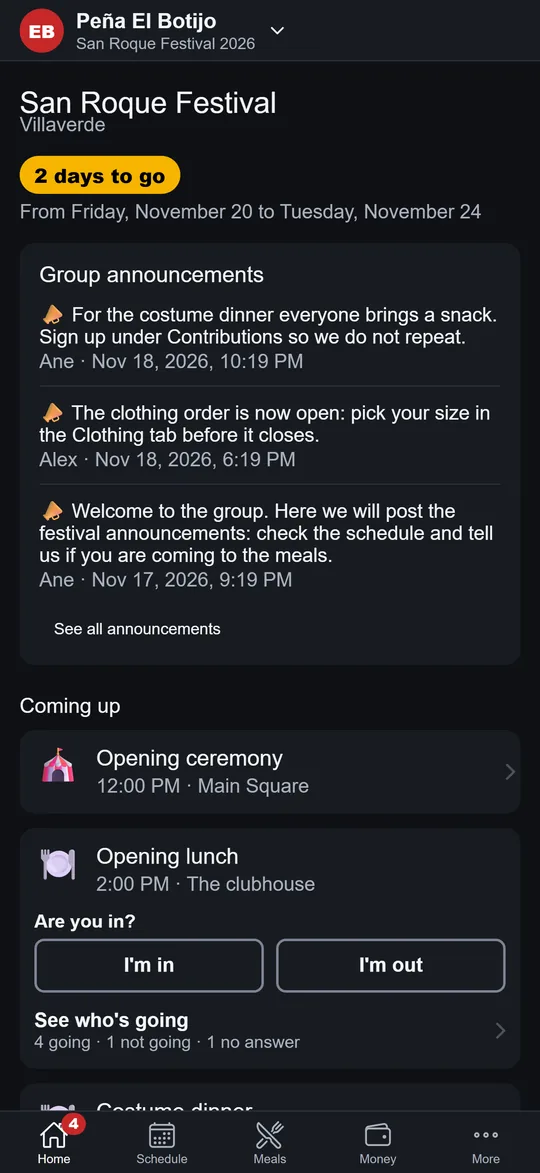
Peñapp is an iPhone and iPad app that lets a group of friends plan together: the schedule of events and meals, a group fund and split costs, dues, group shirts and hoodies, music and ideas, with reminders on every phone. It is built for the Spanish “peña”, a group of friends who run their town's fiestas together, and it works for any crew or club. Each group is a private space you join by invitation, with a link or a QR code.

Download on the App Store

For iPhone and iPad. Free to download with ads; the Premium subscription is optional.

What you can do with Peñapp

Schedule, RSVPs and meals

The full schedule with every event and every meal. Everyone replies with one tap, coming or not, dressing up or not, and you know right away how many people are eating, including each person's guests. You can also sign up who is bringing what: drinks, food, the paella pan or the speaker.

Split costs and shared expenses

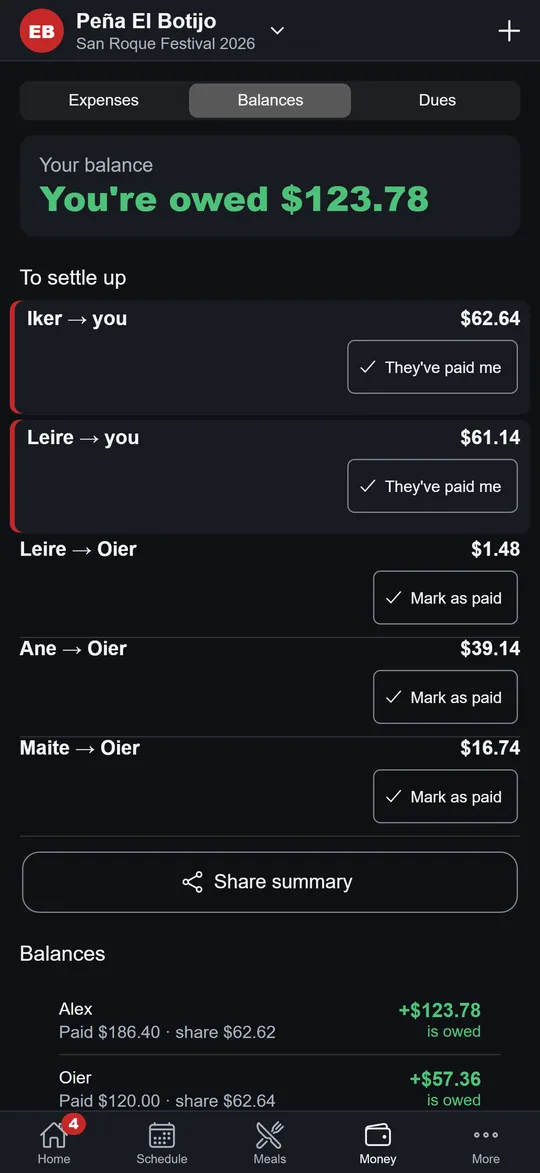
Everyone logs what they pay and who it is split between. Peñapp works out who owes whom and how to settle up in as few payments as possible, and the summary can be shared as a message.

Dues and the group fund

Dues by rate (adult, child…), who has already paid and what is in the group fund. Only the person collecting can mark dues as paid.

Group shirts and hoodies

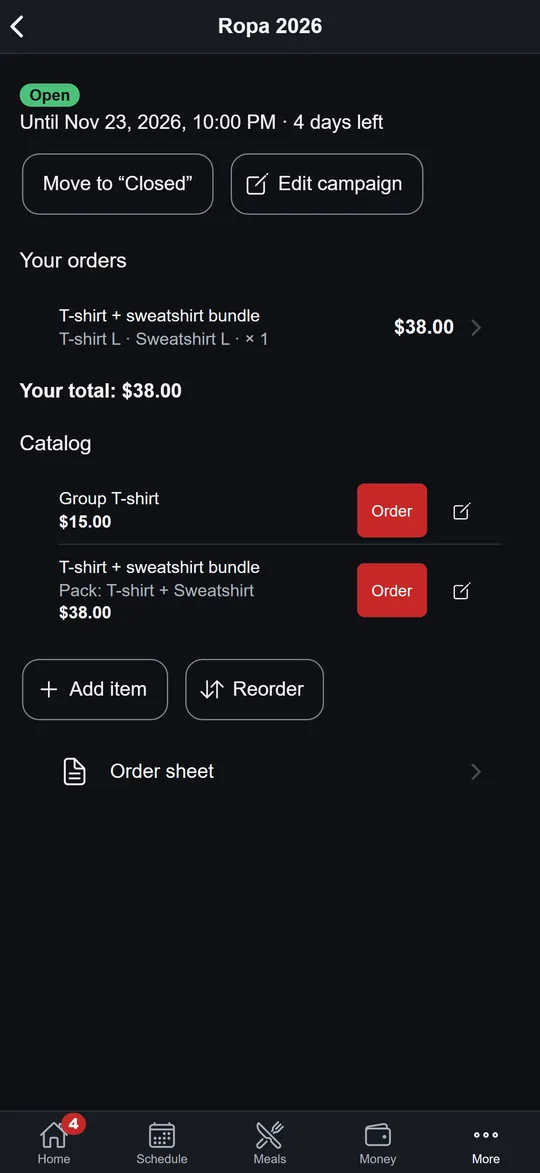
A catalog with photos, sizes and bundles, such as a T-shirt plus a sweatshirt. Everyone places an order, and the organizer exports the order sheet for the supplier as a PDF or a CSV, plus a hand-out list for pickup day.

Music and ideas

Music lists for the venue and an ideas board with votes so the whole group can decide.

Reminders and your own style

Reminders before each event and nudges for people who haven't replied; nothing rings at night unless it is urgent. Each group gets its own style: a template, colors, a logo, a cover photo and a motto.

How to get started

  1. Create your groupGive it a name and a style, and add the dates of your festival.
  2. Invite your crewShare a link or a QR code. Whoever opens it joins, or you can approve each request yourself.
  3. Plan togetherSchedule, meals, group fund, dues and shirts in one place, with reminders on everyone's phone.

Who it is for

For festival crews, clubs and groups of friends who plan together: local fiestas, a festival weekend, a tailgate, a reunion or any recurring event. One account can belong to several groups, and previous years stay saved so you can look back. The app is available in English, Spanish, Catalan, Basque and Galician.

Price

Peñapp is free to download and shows ads. Whoever creates the group opens its modules by watching optional ads: 1 ad to create the group and 3 ads for each of the Expenses and balances and Music modules (listening to music is always free). The rest of the group uses them once the creator has opened them. “Peñapp Premium” removes the ads and opens everything in all your groups: $1.99 per month or $12.99 per year in the US (the App Store shows the price for your country); it renews automatically until you cancel it in your Apple Account settings.

Frequently asked questions

What is a peña?

A peña is a group of friends or relatives in Spain who get together to enjoy their town's or neighborhood's fiestas: it usually has a clubhouse or a meeting place, dues, shared meals and street parties, and a common T-shirt. In some places it is called a cuadrilla, a colla or a pandilla.

How do you organize a group for a festival or fiesta?

The usual steps are to split the roles (who coordinates and who handles the money), agree on the dues per person and by age, prepare the schedule of events and meals, keep the group fund and the expenses clear, and order the group's shirts early. Peñapp brings all of that into one app, so nobody depends on a spreadsheet or a group chat.

How do you split shared expenses and a group fund?

Log each expense with who paid and who it is split between; at the end the balances are added up and the debts are settled in as few payments as possible. Peñapp does the math for you: it tells you who owes whom and how much to settle up, and you can share the summary as a message.

How much should each member pay in dues?

It depends on the group: on the planned costs (venue, meals, music, clothing) and on the number of members. A fixed amount per person is common, lower for children. In Peñapp the organizer sets the rates (adult, child…) and sees who has already paid and what is in the group fund.

How do you organize a group shirt or hoodie order?

The organizer builds a catalog (T-shirts, hoodies, sweatshirts, bundles) with prices and sizes, each member places an order from their phone, and Peñapp produces the order sheet for the supplier as a PDF or a CSV, plus a hand-out list for pickup day.

How much does Peñapp cost?

It is free to download and shows ads. Whoever creates the group watches 1 optional ad to create it and 3 per module for Expenses and balances and Music (listening to music is always free); the rest of the group uses them once the creator has opened them. The optional “Peñapp Premium” subscription ($1.99 per month or $12.99 per year in the US) removes the ads and opens everything; it renews automatically until you cancel.

Does Peñapp collect dues or move money?

No. Peñapp keeps track of who has paid how much, but it does not process payments: the money changes hands however your group prefers, such as cash or a bank transfer.

How do I join my friends' group?

Ask an organizer for the invitation link or code: open the link with the app installed or, in the app, tap “I have a code”. If the group requires it, an organizer will approve your request.

Which devices does Peñapp work on?

Peñapp is on the App Store for iPhone and iPad. There is no Android version for now. You can check the latest data you loaded even without signal.

Where can I get help or delete my account?

The help page has answers and a contact address. To delete your account, go to My account → “Delete my account” in the app, or use the account deletion page on the website if you no longer have the app.

Still have questions? Write to us from the help page. Help and contact